哥特少女勇闯恶魔城2 Sinisistar2 - AES - Rijindael
其实隔壁已经给出答案了,但我还是挺好奇是怎么来的,花了几天看了下。仅供参考。
参考文献
电报的资源
都是序列帧动画,然后基本都是拆分成好几个部分了(比如表情和脸),要看的话只能自己去Unity拼图了。
建议用Raz版AS导出,会跳过重复的资产。
虽然解决的不是很干净利索,但也算是完工了,抛砖引玉下吧。


确定加密
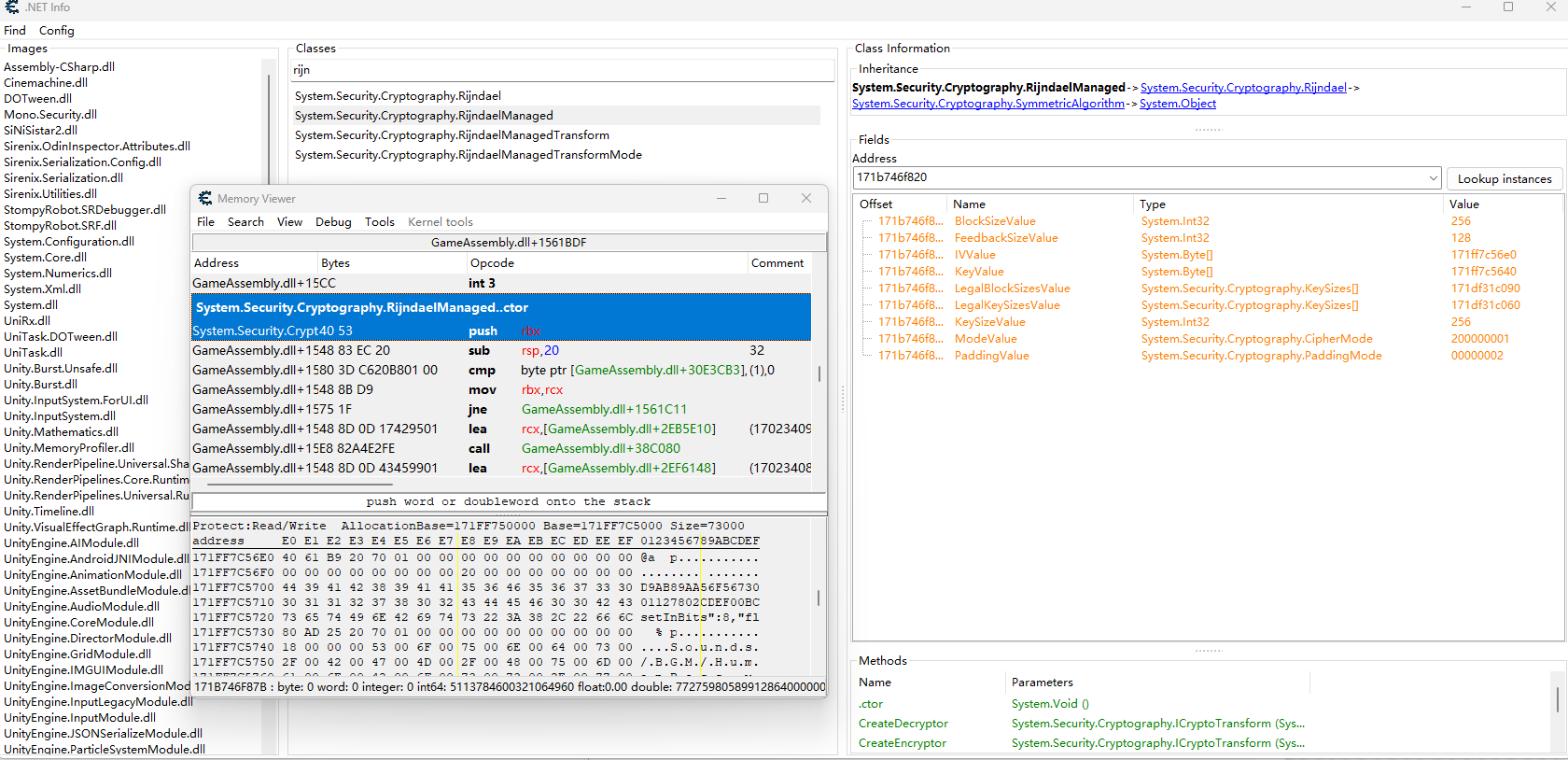
搜索decrypt可以发现有很多个加密/解密相关的信息。
有DES RC2 3DES Rijindael AES这几种加密算法的信息,前面这三个都过时了,很显然应该使用的是后面这两个算法,不过也得看引用情况,说不准是混淆之类的。
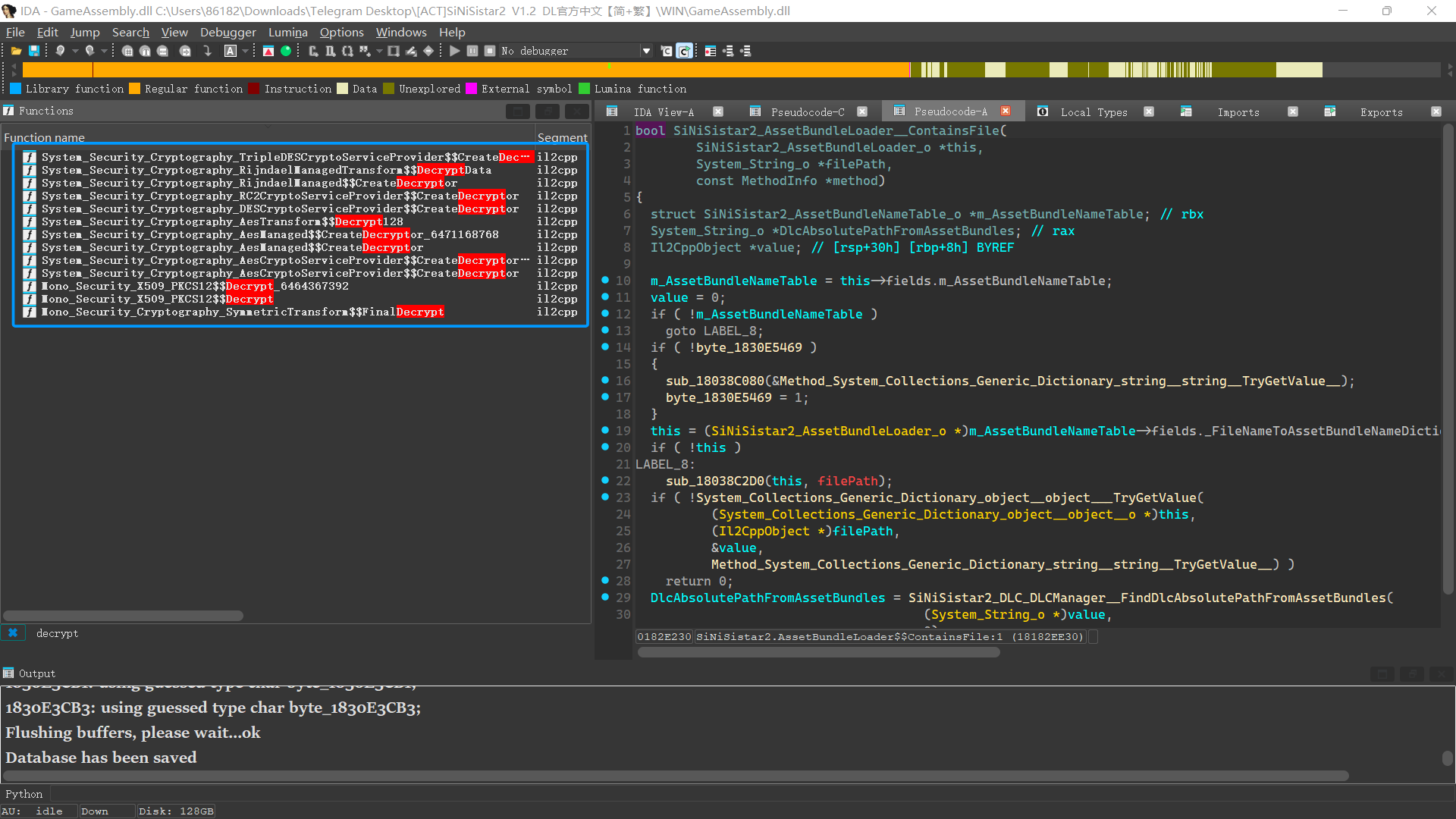
这里区分一下Rijindael和AES的关系:
| 项目 | Rijndael | AES |
|---|---|---|
| 算法本体 | 原始算法 | Rijndael 子集 |
| 分组长度bit | 128–256 可变 | 仅 128 |
| 密钥长度bit | 128–256 可变 | 128 / 192 / 256 |
| 轮数 | 依参数变化 | 固定(10/12/14) |
这些Decryptor都是一些工具方法,而不是实际进行数据处理过程,所以需要看System_Security_Cryptography_RijndaelManagedTransform$$DecryptData以及Mono_Security_Cryptography_SymmetricTransform$$FinalDecrypt
这个FinalDecrypt不难猜到应该是对最后一个块的padding进行处理。
DecryptData 反编译后就有将近900行了,看不了一点,大致可以确定是标准的Rijindael算法,还需要判断一下工作模式,填充处理。
看到输入的参数里有paddingMode,以及fLase (应该是判断是否为Last,也就是最后一块)
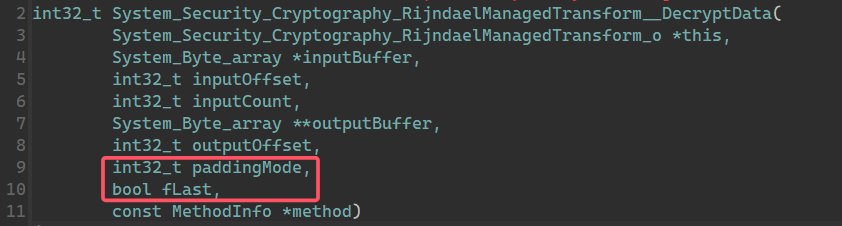
接下来寻找工作模式,值得一提的是,既然需要选择padding的模式,也就说明工作模式肯定是需要padding的,对应的也就是CBC、ECB、PCBC这三种,根据经验来看,默认是CBC了。
接下来观察到这样的两个分支,很显然对2和4两个模式做了专门的处理,是PKCS7和ANSI X923。
| 名称 | 值 | 说明 |
|---|---|---|
| ANSIX923 | 4 | ANSIX923 填充字符串由一个字节序列组成,此字节序列的最后一个字节填充字节序列的长度,其余字节均填充数字零。 |
| ISO10126 | 5 | ISO10126 填充字符串由一个字节序列组成,此字节序列的最后一个字节填充字节序列的长度,其余字节填充随机数据。 |
| None | 1 | 不填充。 |
| PKCS7 | 2 | PKCS #7 填充字符串由一个字节序列组成,每个字节填充该字节序列的长度。 |
| Zeros | 3 | 填充字符串由设置为零的字节组成。 |
if ( paddingMode != 1 )
   {
    if ( paddingMode == 2 )
       { ... }
//...
if ( paddingMode != 3 )
    {
      this = (System_Security_Cryptography_RijndaelManagedTransform_o *)(unsigned int)(paddingMode - 4);
      if ( paddingMode == 4 )
         { ... }
接下来只要获取IV和Key就可以尝试破解了。搜索关键词key
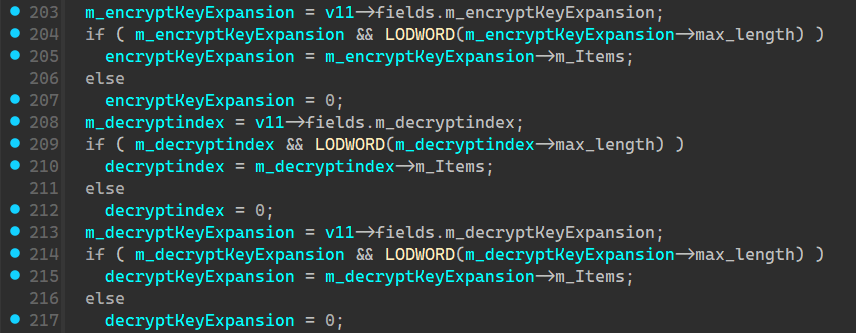
发现这个keyExpansion出现的很频繁,但是找不到IV相关的定义,可能是由其他变量名替代了。
System_Security_Cryptography_RijndaelManagedTransform_o *v11; // rbx
v11 = this;
//...
m_decryptKeyExpansion = v11->fields.m_decryptKeyExpansion;
跳转到fields定义
struct System_Security_Cryptography_RijndaelManagedTransform_o // sizeof=0x80
00000000 {
00000000     System_Security_Cryptography_RijndaelManagedTransform_c *klass;
00000008     void *monitor;
00000010     System_Security_Cryptography_RijndaelManagedTransform_Fields fields;
00000080 };

struct __declspec(align(8)) System_Security_Cryptography_RijndaelManagedTransform_Fields // sizeof=0x70
00000000 {                                       // XREF: System_Security_Cryptography_RijndaelManagedTransform_o/r
00000000     int32_t m_cipherMode;
00000004     int32_t m_paddingValue;
00000008     int32_t m_transformMode;
0000000C     int32_t m_blockSizeBits;
00000010     int32_t m_blockSizeBytes;
00000014     int32_t m_inputBlockSize;
00000018     int32_t m_outputBlockSize;
0000001C     // padding byte
0000001D     // padding byte
0000001E     // padding byte
0000001F     // padding byte
00000020     struct System_Int32_array *m_encryptKeyExpansion;
00000028     struct System_Int32_array *m_decryptKeyExpansion;
00000030     int32_t m_Nr;
00000034     int32_t m_Nb;
00000038     int32_t m_Nk;
0000003C     // padding byte
0000003D     // padding byte
0000003E     // padding byte
0000003F     // padding byte
00000040     struct System_Int32_array *m_encryptindex;
00000048     struct System_Int32_array *m_decryptindex;
00000050     struct System_Int32_array *m_IV;
00000058     struct System_Int32_array *m_lastBlockBuffer;
00000060     struct System_Byte_array *m_depadBuffer;
00000068     struct System_Byte_array *m_shiftRegister;
00000070 };
发现了IV的信息。接下来只要找到对应的赋值语句了。
最简单的方式就是去构造函数里面看看
搜搜RijndaelManagedTransform 找到ctor 和 cctor,然后依次向上寻找调用点以及对应的ctor,尽量找相关联的,比如这里有encrypt和decrypt,肯定优先看decrypt

依旧只是调用,不能直接找到赋值。
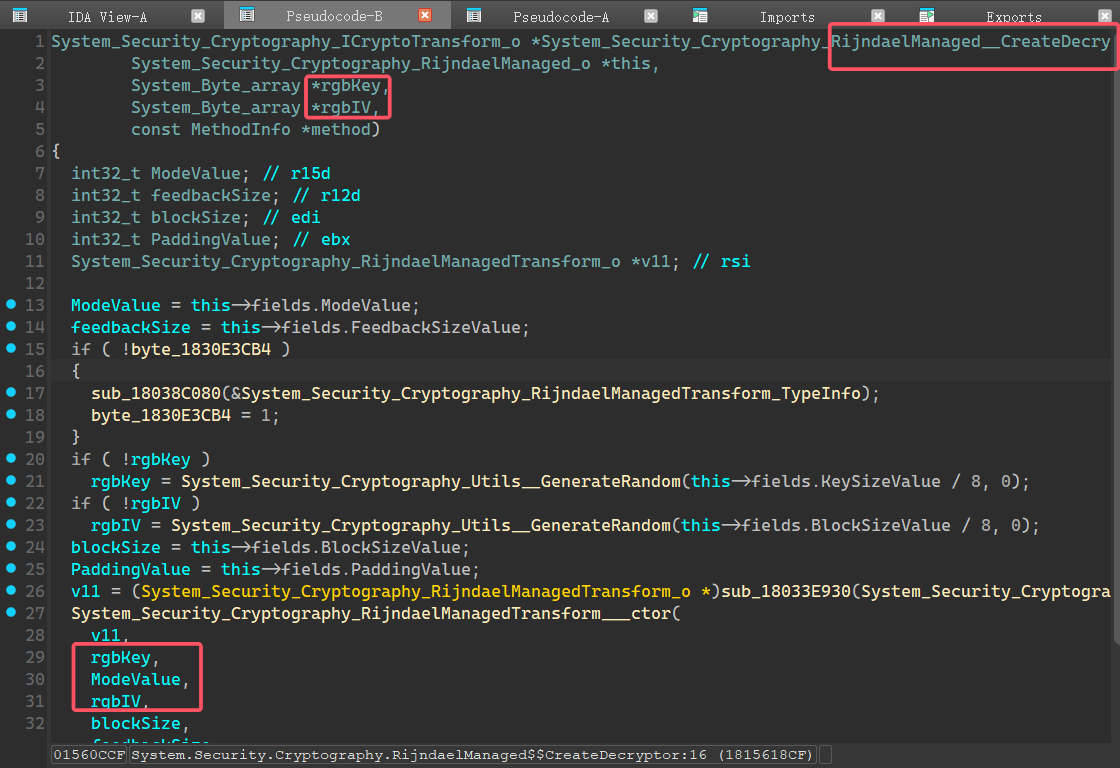
继续向上。。。
XREF为o以及行数是1的不用看
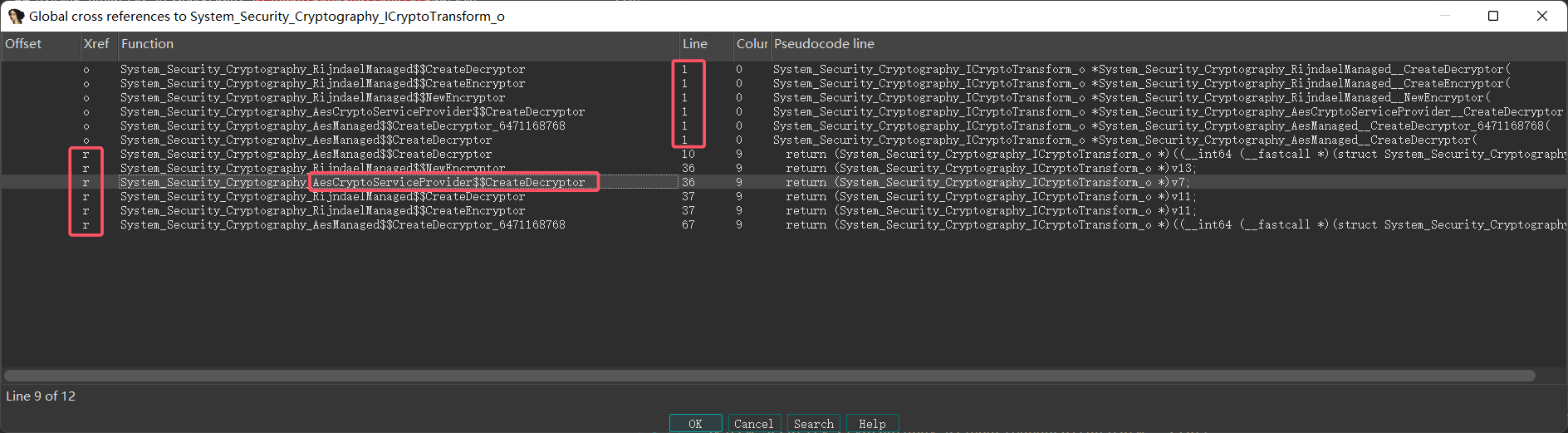
运气不太好,这些相关的函数都没有实质性的信息。
其实也没有太多固定的方法,大多数时候要点运气,后来在dump.cs里面搜到了一个Util类
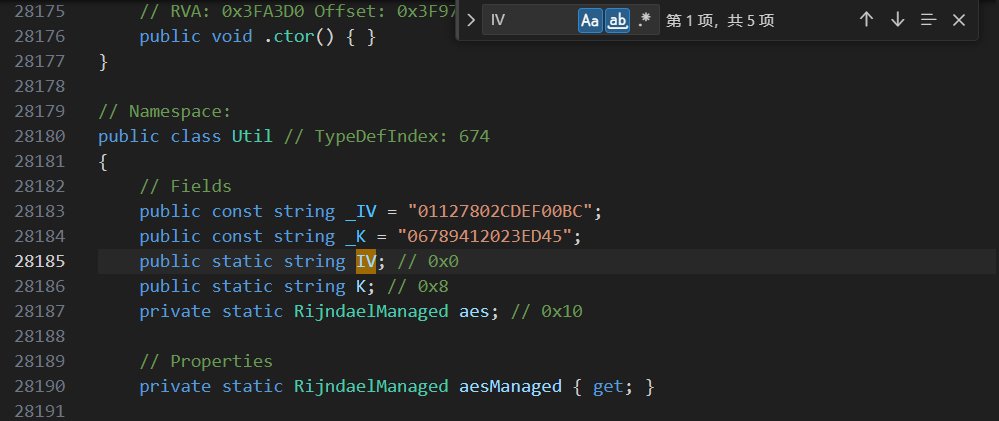
然后可以看下Util类的方法
Util
System_Security_Cryptography_RijndaelManaged_o *Util__get_aesManaged(const MethodInfo *method)
{
  Util_c *v1; // rcx
  System_Security_Cryptography_RijndaelManaged_o *v2; // rbx
  struct Util_StaticFields *static_fields; // rdx
  void *aes; // rcx
  struct System_Security_Cryptography_RijndaelManaged_o *v5; // rbx
  System_Text_Encoding_o *UTF8; // rax
  __int64 v7; // rax
  struct System_Security_Cryptography_RijndaelManaged_o *v8; // rbx
  System_Text_Encoding_o *v9; // rax
  __int64 v10; // rax

  if ( !byte_1830E4F1F )
  {
    sub_18038C080(&System_Security_Cryptography_RijndaelManaged_TypeInfo);
    sub_18038C080(&Util_TypeInfo);
    byte_1830E4F1F = 1;
  }
  v1 = Util_TypeInfo;
  if ( !Util_TypeInfo->static_fields->aes )
  {
    Util__Update(0);
    v2 = (System_Security_Cryptography_RijndaelManaged_o *)sub_18033E930(System_Security_Cryptography_RijndaelManaged_TypeInfo);
    System_Security_Cryptography_RijndaelManaged___ctor(v2, 0);
    Util_TypeInfo->static_fields->aes = v2;
    sub_18038B400(&Util_TypeInfo->static_fields->aes, v2);
    aes = Util_TypeInfo->static_fields->aes;
    if ( !aes )
      goto LABEL_14;
    (*(void (__fastcall **)(void *, __int64, _QWORD))(*(_QWORD *)aes + 552LL))(
      aes,
      256,
      *(_QWORD *)(*(_QWORD *)aes + 560LL));
    aes = Util_TypeInfo->static_fields->aes;
    if ( !aes )
      goto LABEL_14;
    (*(void (__fastcall **)(void *, __int64, _QWORD))(*(_QWORD *)aes + 424LL))(
      aes,
      256,
      *(_QWORD *)(*(_QWORD *)aes + 432LL));
    aes = Util_TypeInfo->static_fields->aes;
    if ( !aes )
      goto LABEL_14;
    (*(void (__fastcall **)(void *, __int64, _QWORD))(*(_QWORD *)aes + 584LL))(
      aes,
      1,
      *(_QWORD *)(*(_QWORD *)aes + 592LL));
    v5 = Util_TypeInfo->static_fields->aes;
    UTF8 = System_Text_Encoding__get_UTF8(0);
    if ( !UTF8 )
      goto LABEL_14;
    v7 = ((__int64 (__fastcall *)(System_Text_Encoding_o *, struct System_String_o *, const MethodInfo *))UTF8->klass->vtable._17_GetBytes.methodPtr)(
           UTF8,
           Util_TypeInfo->static_fields->IV,
           UTF8->klass->vtable._17_GetBytes.method);
    if ( !v5 )
      goto LABEL_14;
    ((void (__fastcall *)(struct System_Security_Cryptography_RijndaelManaged_o *, __int64, const MethodInfo *))v5->klass->vtable._10_set_IV.methodPtr)(
      v5,
      v7,
      v5->klass->vtable._10_set_IV.method);
    v8 = Util_TypeInfo->static_fields->aes;
    v9 = System_Text_Encoding__get_UTF8(0);
    aes = Util_TypeInfo;
    static_fields = Util_TypeInfo->static_fields;
    if ( !v9
      || (v10 = ((__int64 (__fastcall *)(System_Text_Encoding_o *, struct System_String_o *, const MethodInfo *))v9->klass->vtable._17_GetBytes.methodPtr)(
                  v9,
                  static_fields->K,
                  v9->klass->vtable._17_GetBytes.method),
          !v8)
      || (((void (__fastcall *)(struct System_Security_Cryptography_RijndaelManaged_o *, __int64, const MethodInfo *))v8->klass->vtable._12_set_Key.methodPtr)(
            v8,
            v10,
            v8->klass->vtable._12_set_Key.method),
          (aes = Util_TypeInfo->static_fields->aes) == 0) )
    {
LABEL_14:
      sub_18038C2D0(aes, static_fields);
    }
    (*(void (__fastcall **)(void *, __int64, _QWORD))(*(_QWORD *)aes + 616LL))(
      aes,
      2,
      *(_QWORD *)(*(_QWORD *)aes + 624LL));
    v1 = Util_TypeInfo;
  }
  return v1->static_fields->aes;
}
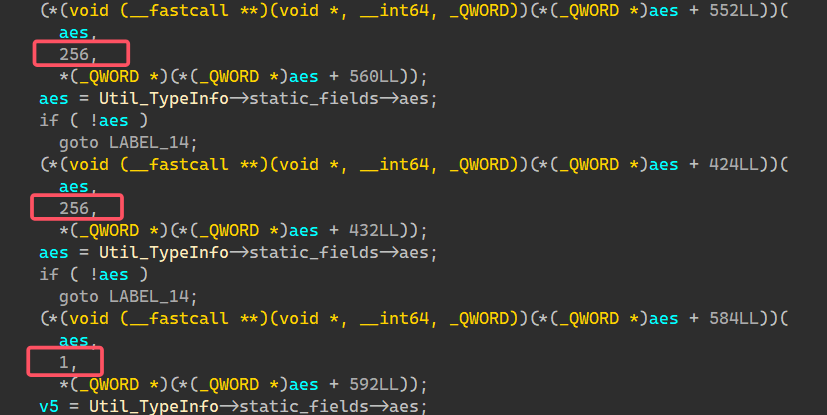
这里的几个数字很有趣
aes的数据类型一路溯源可以找到
struct __declspec(align(8)) System_Security_Cryptography_SymmetricAlgorithm_Fields // sizeof=0x38
00000000 {                                       // XREF: System_Security_Cryptography_SymmetricAlgorithm_o/r
00000000                                         // System_Security_Cryptography_Aes_Fields/r ...
00000000     int32_t BlockSizeValue;
00000004     int32_t FeedbackSizeValue;
00000008     struct System_Byte_array *IVValue;
00000010     struct System_Byte_array *KeyValue;
00000018     struct System_Security_Cryptography_KeySizes_array *LegalBlockSizesValue;
00000020     struct System_Security_Cryptography_KeySizes_array *LegalKeySizesValue;
00000028     int32_t KeySizeValue;
0000002C     int32_t ModeValue;
00000030     int32_t PaddingValue;
00000034     // padding byte
00000035     // padding byte
00000036     // padding byte
00000037     // padding byte
00000038 };
按照偏移量也就是顺序来看:
256只能是Keysize或者是BlockSize,得出的信息是BlockSize = 256 bit Keysize = 256bit
因为CipherMode.CBC = 1,所以对应工作模式CBC
| 名称 | 值 |
|---|---|
| CBC | 1 |
| CFB | 4 |
| CTS | 5 |
| ECB | 2 |
| OFB | 3 |
所以Rijndael-CBC-256
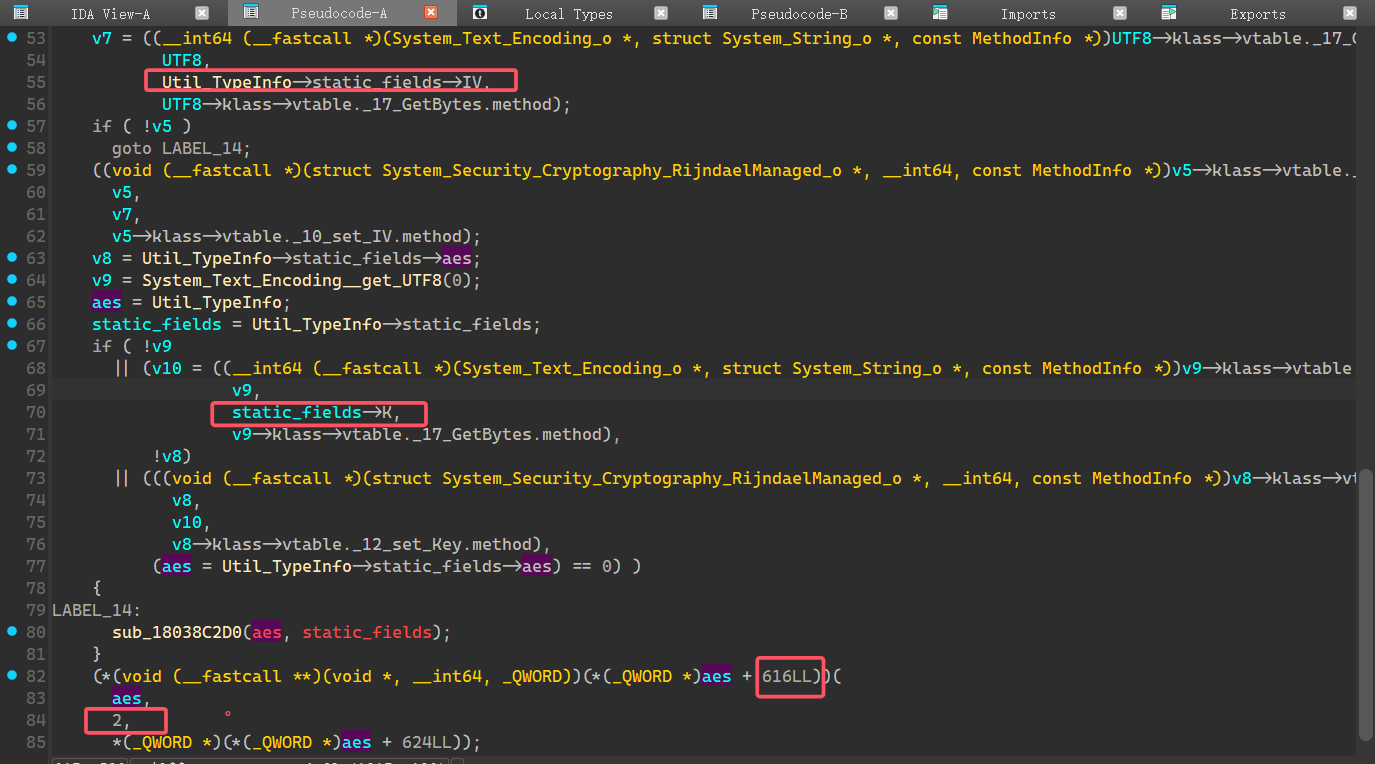
aes.IV = Encoding.UTF8.GetBytes(Util.IV);
aes.Key = Encoding.UTF8.GetBytes(Util.K);
IV 和 Key 来源是 字符串 ,使用 UTF-8编码把ASCII字符转为字节
所以可以确定原始的IV和KEY的长度跟转化后是一致的,32B也就是32个字符,这里需要记住长度,后面会用到。
然后最后这个2毫无疑问对应的是padding了
PaddingMode.PKCS7 = 2所以填充方式是PKCS7
完整的加密方式为:Rijndael-256-CBC-PKCS7
寻找 IV 和 KEY
接下来只需要找出静态域的Key和IV了
继续寻找Util相关函数,发现没有ctor,但是有一个Update完成了初始化数据。
void Util__Update(const MethodInfo *method)
{
  Il2CppObject *object; // rax
  __int64 v2; // rdx
  __int64 v3; // rcx
  Il2CppObject *v4; // rbx
  struct System_String_o *v5; // rax
  struct System_String_o *v6; // rax

  if ( !byte_1830E4F20 )
  {
    sub_18038C080(&Method_UnityEngine_Resources_Load_Unique___);
    sub_18038C080(&Util_TypeInfo);
    sub_18038C080(&StringLiteral_6649);
    sub_18038C080(&StringLiteral_10860);
    sub_18038C080(&StringLiteral_6614);
    byte_1830E4F20 = 1;
  }
  if ( System_String__IsNullOrEmpty(Util_TypeInfo->static_fields->IV, 0) )
  {
    object = UnityEngine_Resources__Load_object_(StringLiteral_10860, Method_UnityEngine_Resources_Load_Unique___);
    v4 = object;
    if ( !object )
      sub_18038C2D0(v3, v2);
    v5 = System_String__Concat_6464675520((System_String_o *)object[2].klass, StringLiteral_6614, 0);
    Util_TypeInfo->static_fields->IV = v5;
    sub_18038B400(Util_TypeInfo->static_fields, v5);
    v6 = System_String__Concat_6464675520((System_String_o *)v4[2].monitor, StringLiteral_6649, 0);
    Util_TypeInfo->static_fields->K = v6;
    sub_18038B400(&Util_TypeInfo->static_fields->K, v6);
  }
}
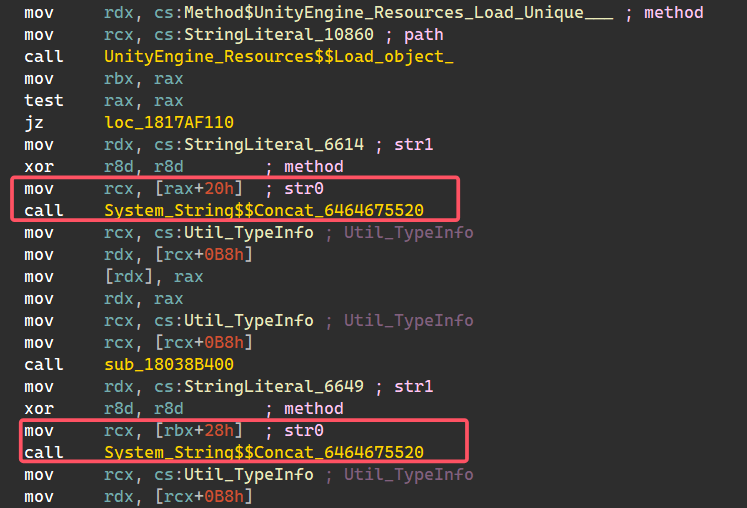
查看汇编视图直接得到了这几个常量的字符值。

可以初步得到的信息:
object = UnityEngine_Resources__Load_object_("Manager/unique", Method_UnityEngine_Resources_Load_Unique___);
K  = object[2].monitor + "06789412023ED45";
IV = object[2].klass + "01127802CDEF00BC";

# Il2CppObject是某一个没有确定的类型,所以取了一个笼统的名字object
00000000 struct Il2CppObject // sizeof=0x10
00000000 {                                       // XREF: MidasTouch_State_array/r
00000000                                         // UnityEngine_GameObject_array/r ...
00000000     Il2CppClass *klass;                 // XREF: sub_180248F60+48/w
00000008     void *monitor;                      // XREF: sub_180248F60+4D/w
00000010 };
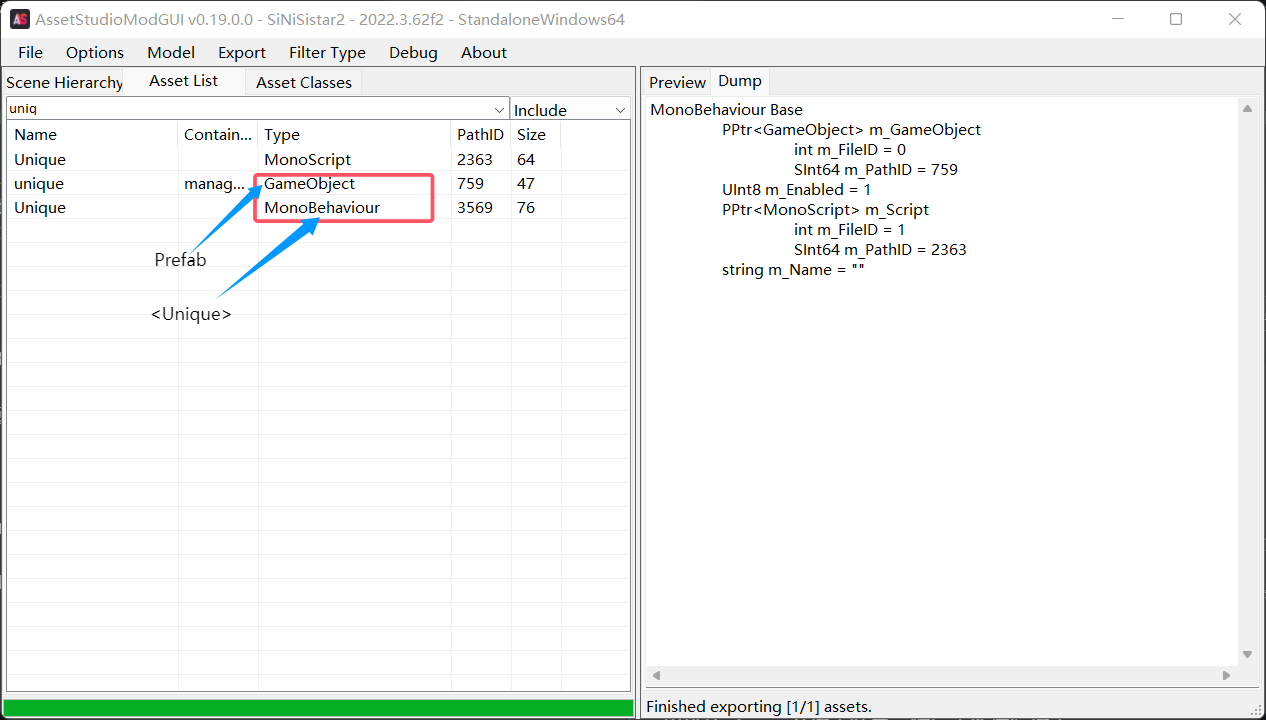
object应该是从这个路径"Manager/unique"上加载的一个文件,同时Method_UnityEngine_Resources_Load_Unique___这里说明了类型是<Unique>
以及拼接使用的字符值偏移量20h,28h
可以在dump.cs找到Unique定义,发现这里的偏移量也是20和28,正好对应上了。
// Namespace:
public class Unique : MonoBehaviour // TypeDefIndex: 673
{
	// Fields
	public string x; // 0x20
	public string y; // 0x28

	// Methods

	// RVA: 0x3FA3D0 Offset: 0x3F97D0 VA: 0x1803FA3D0
	public void .ctor() { }
}
x -> klass
y -> monitor
可以进一步细化结果
K  = y + "06789412023ED45"; # y是 32-15 = 17个字符
IV = x + "01127802CDEF00BC"; # x是 32-16 = 16个字符
所以接下来只需要找到这个unique文件即可。
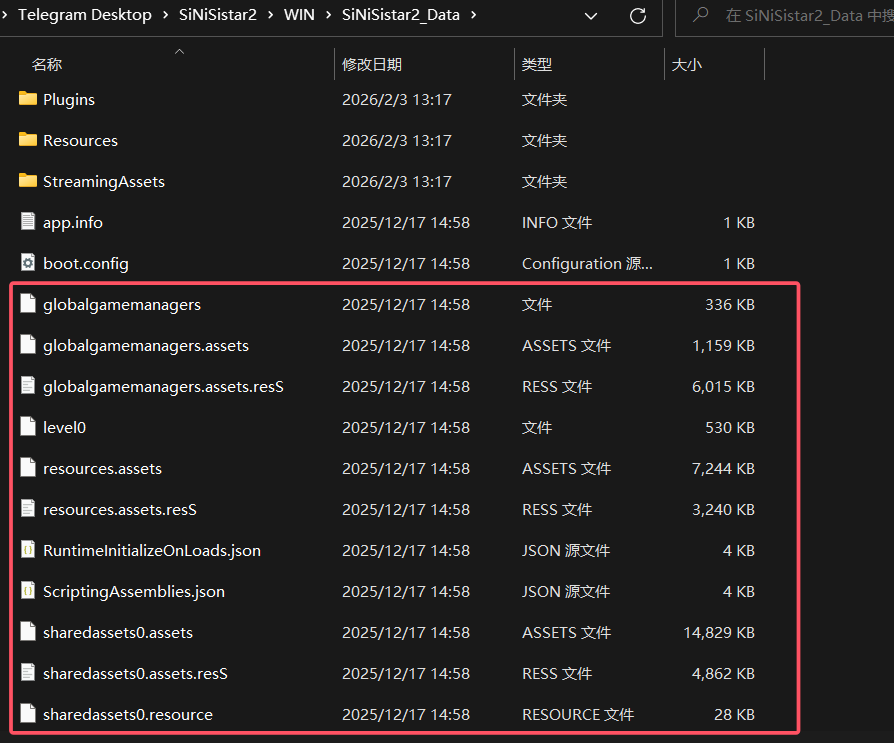
但是对于Unity而言Resources资源存储在resources.assets、resources.assets.resS、sharedassets0.assets、sharedassets0.assets.resS等文件中,不确定最好全部导AS里面,然后查找。
大概就是这些玩意
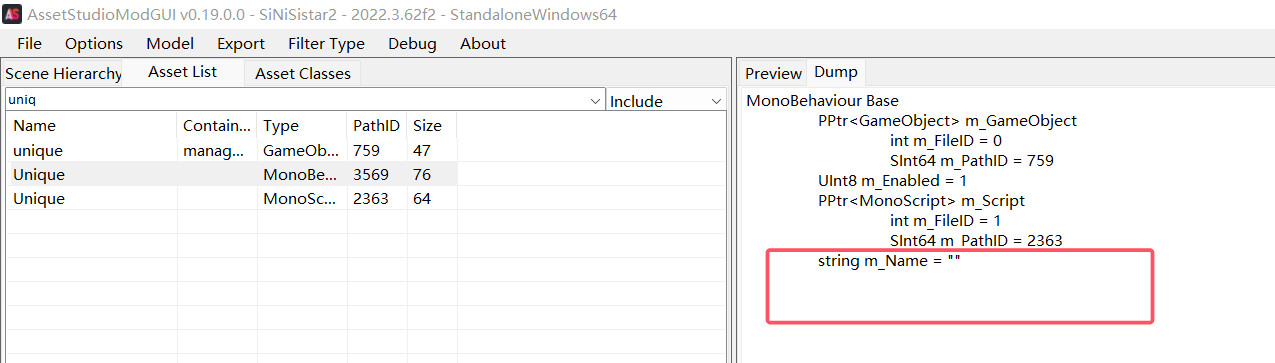
设置里需要打开Display all assets然后导入文件,不然看不到unique。
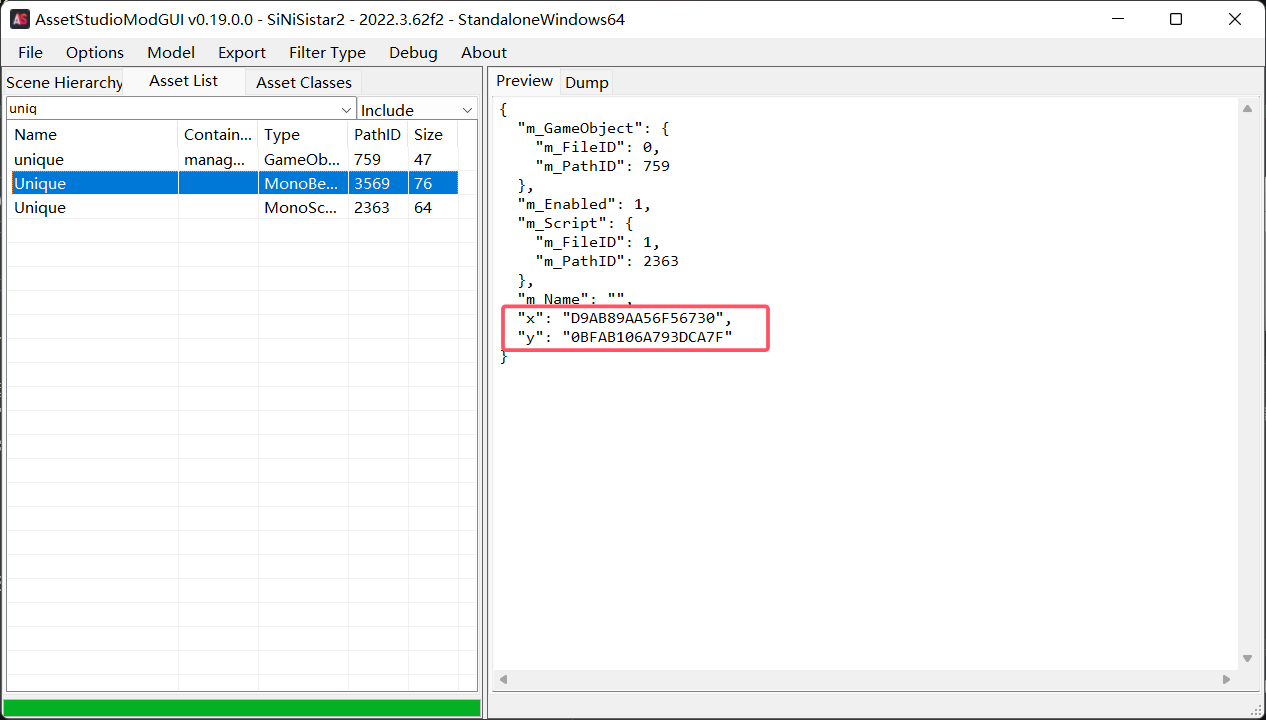
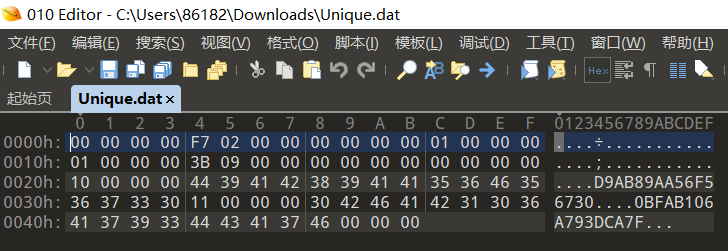
虽然找到了这个东西,但是几乎没有任何有意义的信息。
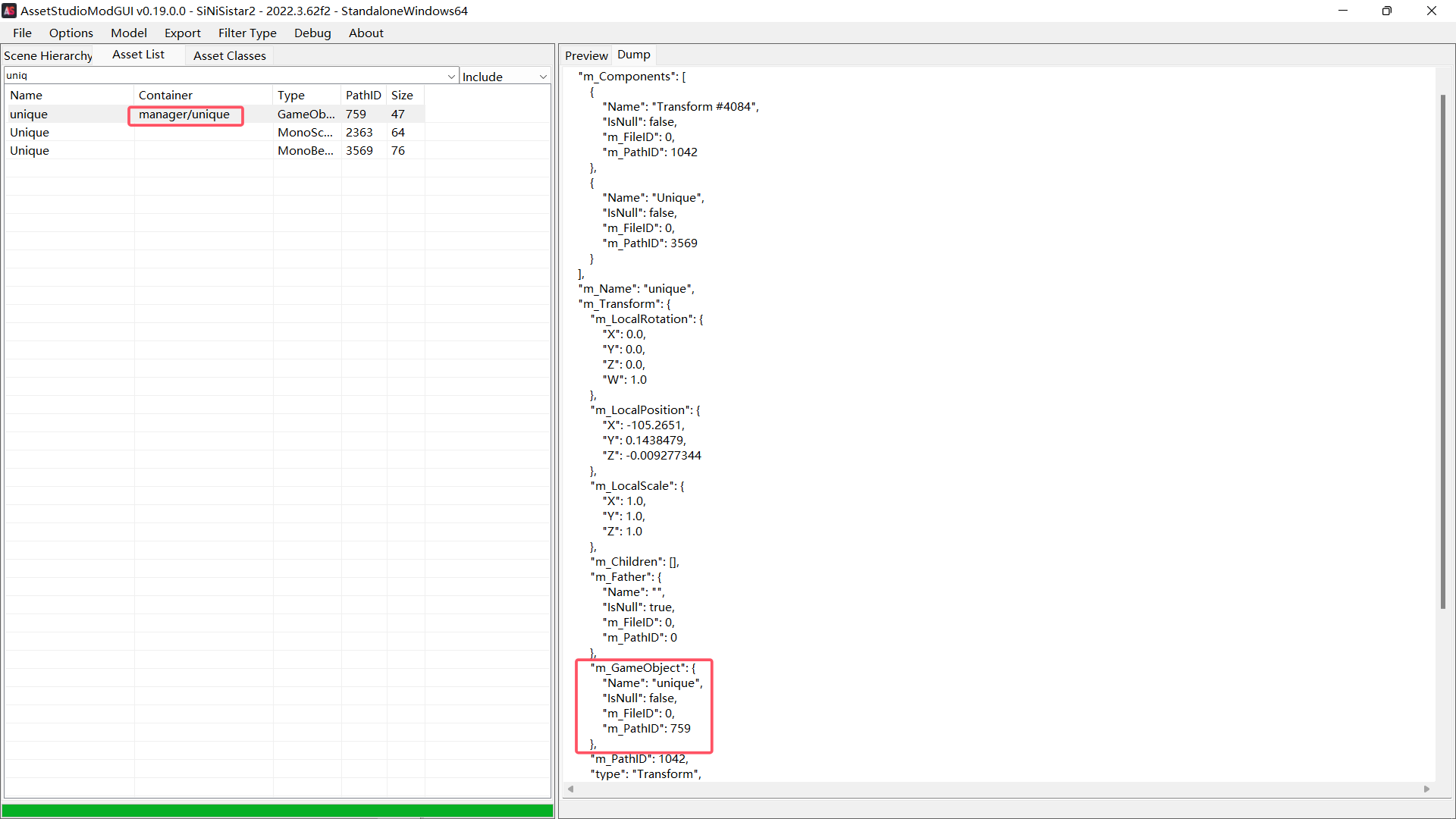
不知道是不是使用方式有问题。
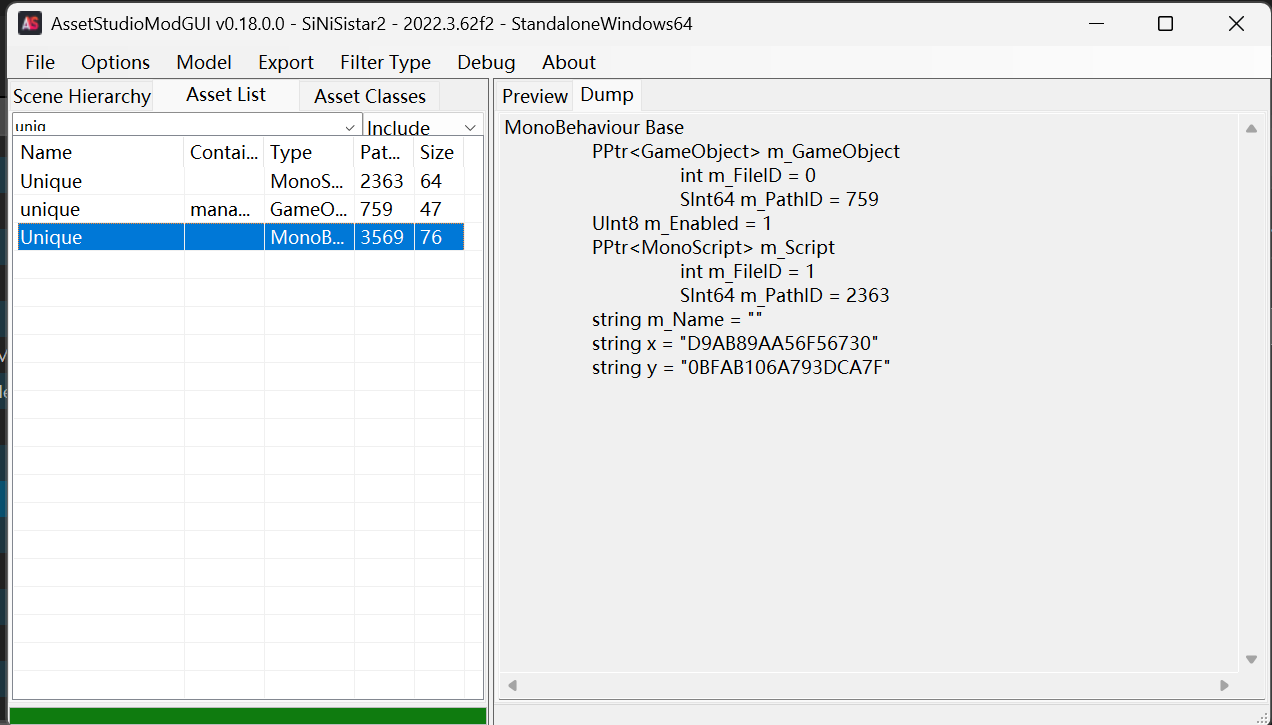
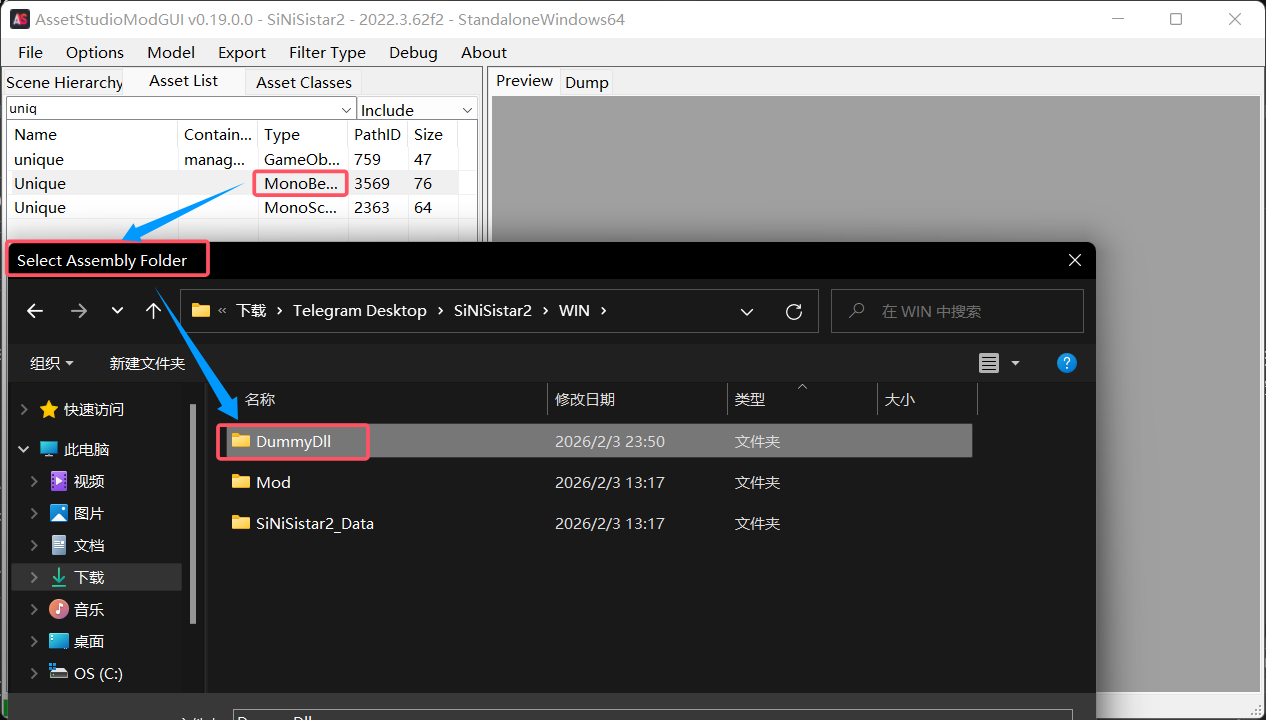
这里之前没有x和y的值,因为之前选择Monobehaviour时候AS会弹出一个框让你选择assembly加载dll还原数据,之前没想太多就关了
顺利导入后就会正常显示x和y
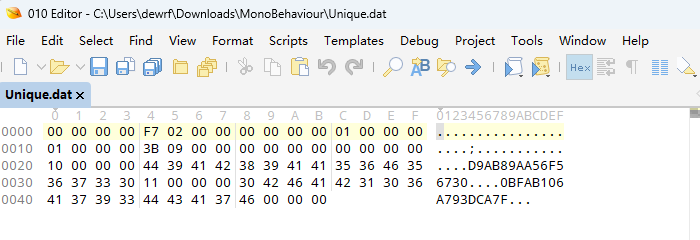
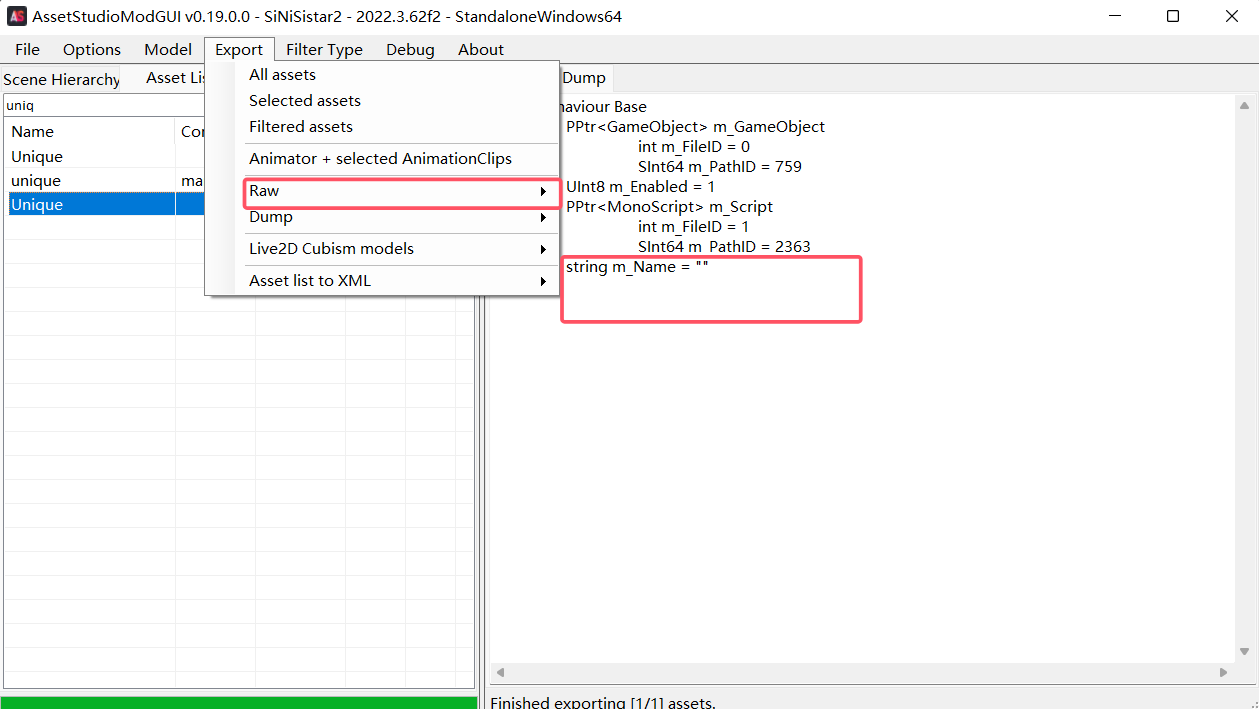
或者导出原始数据查看。
CE搜索内存
用IDA调试的时候游戏里一读档就一直报错卡异常,无语了。
突然发现可以用CE硬搜,前文已经得出了两个关键的拼接串,所以可以用CE直接搜索内存,但是不知道为什么这个CE没有搜索子串的方法(也可能是我没找到),只能搜索精确值。
然后可以枚举一下,因为这里的IV和KEY都是 32个字符
所以IV需要枚举前16位,KEY需要枚举前17位
其实最多也就 16 * 16 + 16 * 17 = 528 次就能搞定。
比如这里搜01127802CDEF00BC会显示有50个地址。(注意搜索的值类型)
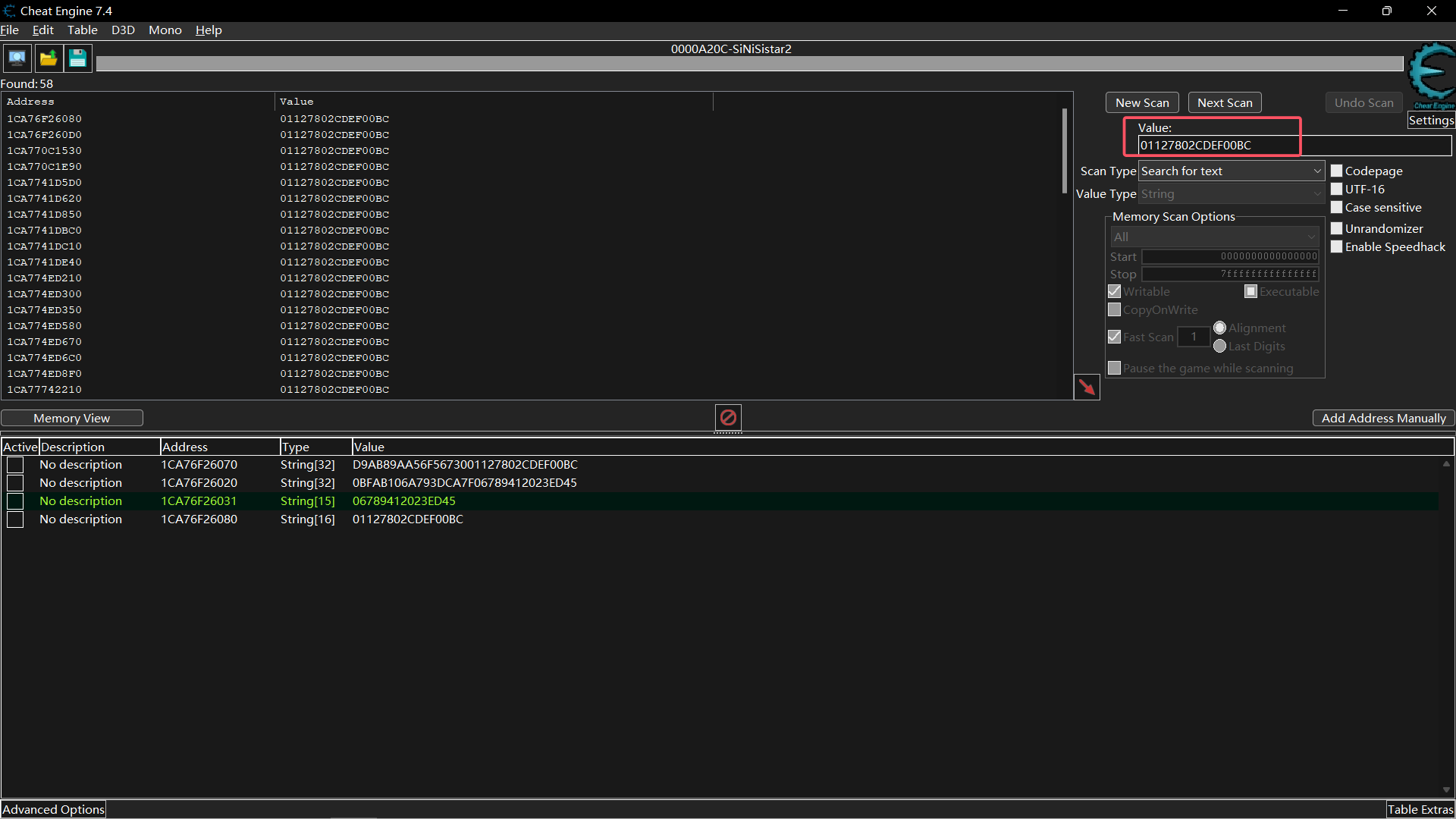
然后向前添加一位,尝试0~F,发现添加0之后还是可以搜索到50多个地址,但是添加1就什么都没有,可以说明添加0是对的。
如果我们搜到了同一个串,那么每次添加一个位,地址应该是邻近的。
这里保存下前三个搜索结果,然后重新进行搜索:
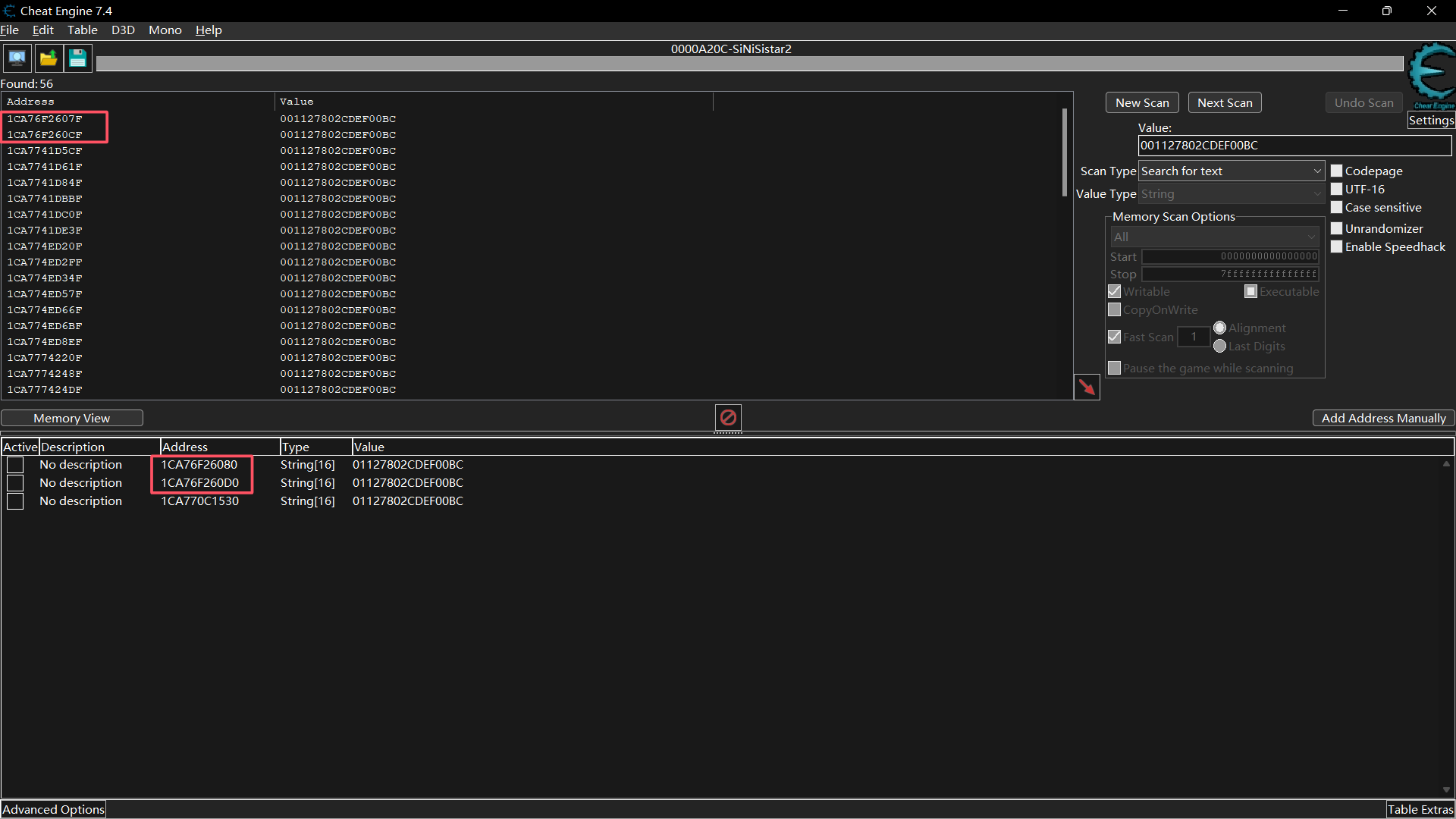
发现地址确实跟假设的一样,是相邻的。不妨大胆一点,直接算一下地址,这里已经找到了1位,所以还剩15位,也就是地址偏移0x0F
0x1CA76F2607F - 0x0F = 0x1CA76F26070
手动添加一下地址0x1CA76F26070 ,这里自动读出来了内容。
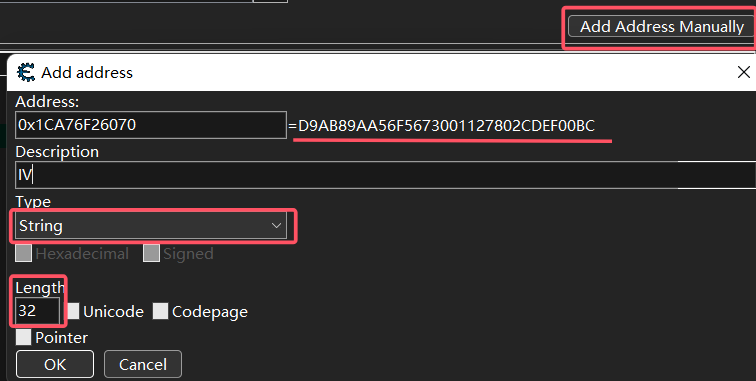
成功得到了IVD9AB89AA56F5673001127802CDEF00BC
同理可得KEY0BFAB106A793DCA7F06789412023ED45
0x1C98502A9E0 - Ox10 = 0x1C98502A9D0
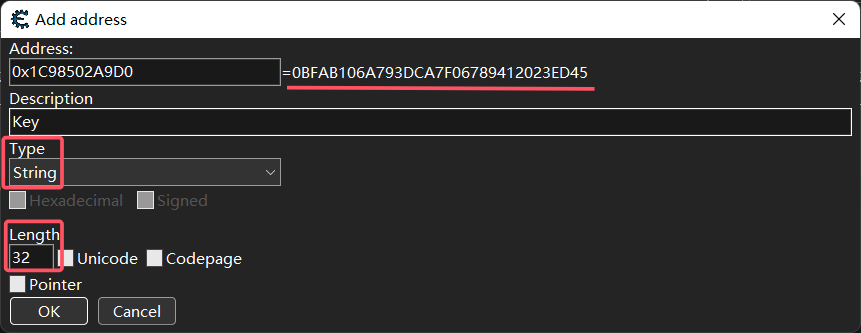
虽然有点丑陋,不过好在没有烂尾。
总结
- 确定加密方式Rijndael-256-CBC-PKCS7
- 找到IV和KEY的生成方式
- CE
Rijndael-256-CBC-PKCS7
IVD9AB89AA56F5673001127802CDEF00BC
KEY0BFAB106A793DCA7F06789412023ED45
注意这里的IV和KEY需要用UTF-8编码
aes.IV = Encoding.UTF8.GetBytes(Util.IV);
aes.Key = Encoding.UTF8.GetBytes(Util.K);
之前用py3rijindael来算,发现太慢了这也,byd满载跑了一晚上快8个小时,最后一个50M的文件跑了一个小时还没跑出来,不建议使用。
Rijindael.py
用pythonnet甚至不要10分钟
只存了图像和音频,自取。
GamesArchive/Sinisistar2
若内容对你有所帮助,欢迎点击右下角 表示支持,你的鼓励将成为我持续更新的动力(maybe)。